

Trade Pokémon in FRLG with a Real, Unmodded Switch, From Your Own Computer
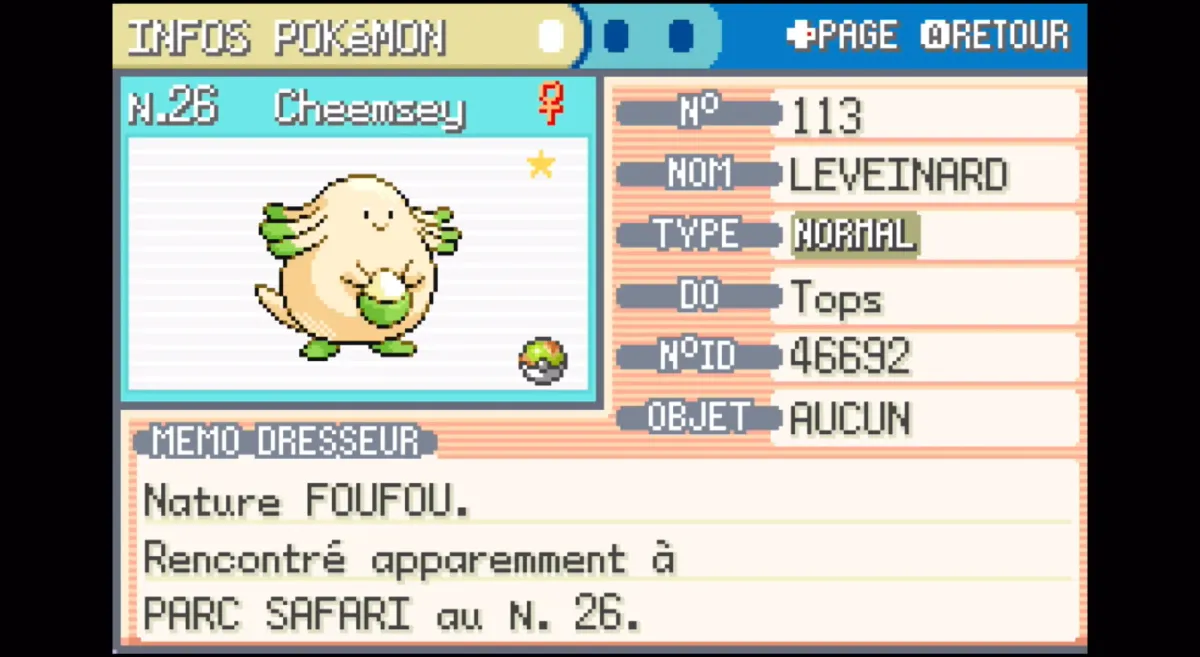
FireRed and LeafGreen on Nintendo Switch Online trade over local wireless, the same way two real consoles do when they sit next to each other. Nothing about that goes through Nintendo's servers.
So if a Linux machine can speak that wireless protocol, it can pretend to be the second Switch.
That is exactly what frlg-ldn-trade does.
With it you can:
- Trade any Pokémon into your save, in the real Trade Center, with the real animation
- Send Mystery Gift Wonder Cards to your console, and collect the gift from the delivery man
The Switch you play on stays completely stock. No mods, no custom firmware, no soldering.
This guide covers my exact setup: a MacBook (Apple Silicon) running Ubuntu in a VMware Fusion VM, with a €15 USB WiFi adapter.
1. What you need
Hardware
| Item | Notes |
|---|---|
| Switch or Switch 2 with FireRed/LeafGreen | Via Nintendo Switch Online. Played far enough to unlock the Direct Corner (~20-40 min) |
| TP-Link Archer T3U USB WiFi adapter | ~€15-20. USB ID 2357:012d, driver rtw88_8822bu |
| A Mac (or any computer) to run Linux | I use a MacBook M4 |
Amazon link: https://link.amazon/B05qVHcIX
The adapter matters. Most WiFi chips cannot do what this needs. Two are proven:
| Adapter | Driver | Reliability |
|---|---|---|
| TP-Link Archer T3U | rtw88_8822bu |
High, recommended and the cheapest |
| ALFA AWUS036ACHM | mt76x0u |
High |
| Realtek RTL8821CE (internal) | rtw88_8821ce |
High |
Known not to work: Intel AX200, Atheros AR9271.
Software
- VMware Fusion, free for personal use
- Ubuntu 24.04 LTS, on Apple Silicon you need the ARM64 build (Ubuntu on ARM)
- Your Switch's
prod.keys
You need prod.keys dumped from a Switch. The protocol is encrypted and there is no way around it.
The console you play on stays stock, but the keys have to come from somewhere. If you don't have them, this project isn't for you yet.
2. Set up the Ubuntu VM
Install VMware Fusion, then create a new VM from the Ubuntu ARM64 ISO. Defaults are fine. 2 CPUs and 4 GB RAM is plenty.
Once Ubuntu is installed, plug in the Archer T3U and connect it to the VM:
VMware Fusion menu bar > Virtual Machine > USB & Bluetooth > Connect TP-Link 802.11ac WLAN Adapter
Then inside Ubuntu, check that Linux sees it:
lsusb | grep 2357
You should get:
Bus 001 Device 007: ID 2357:012d TP-Link Archer T3U [Realtek RTL8812BU]
And confirm the driver loaded. No driver install needed, rtw88_8822bu ships with the Ubuntu kernel:
lsmod | grep rtw88_8822bu
rtw88_8822bu           12288  0
rtw88_usb              32768  1 rtw88_8822bu
rtw88_8822b           229376  1 rtw88_8822bu
Find the interface name:
iw dev
3. Install the project
sudo apt update
sudo apt install -y git python3-venv python3-pip
git clone https://github.com/Decryptu/frlg-ldn-trade.git
cd frlg-ldn-trade
python3 -m venv .venv
./.venv/bin/pip install -r requirements.txt
Put your keys where the tools expect them:
mkdir -p ~/.switch
cp /path/to/prod.keys ~/.switch/prod.keys
Keep NetworkManager out of the way
This is the step people miss. The project creates temporary network interfaces mid-run.
NetworkManager grabs them and the connection dies with:
[Errno 114] Match already configured
Marking your WiFi card "unmanaged" is not enough. You have to exclude the interfaces by name:
sudo tee /etc/NetworkManager/conf.d/zz-ldn-unmanaged.conf > /dev/null <<'EOF'
[keyfile]
unmanaged-devices=interface-name:ldnclient;interface-name:ldn;interface-name:ldn-mon;interface-name:ldn-tap
EOF

sudo systemctl restart NetworkManager
Check everything
./scripts/preflight_pi.sh
Despite the name, it works on any Linux box, not just a Raspberry Pi. Every line should say OK.
4. Example 1: Mystery Gift
Your computer becomes a Wonder Card distributor. Your save needs Mystery Gift already unlocked.
On Linux, start the host:
sudo -E ./.venv/bin/python -u frlgmg_host.py \
  --gift beast-cutscene \
  --flag-id 1005 \
  --version firered \
  --client-ready-idle-frames 20
Wait for:
Hosting Mystery Gift. On the Switch choose Mystery Gift -> Wonder Cards -> Friend.
On the Switch: Mystery Gift > Wonder Cards > Friend
The console finds the host and pulls down the card. You'll see:
Console identified itself: 'YOURNAME' on FireRed, holding no Wonder Card
Mystery Gift server finished: Wonder Card sent
The console left LDN after confirming Mystery Gift close
Now walk into any Pokémon Center and talk to the delivery man to collect the gift.
Tip:--flag-idis the "receipt" flag. Once a save has received flag1005, it won't take that gift again. Use a different number (1006,1007, etc.) to receive it a second time.
5. Example 2: Trading, with Linux as the host
Here Linux runs the group and the Switch joins it.
You need at least two .pk3 files. These are the Pokémon in your computer's fake party.
One of them is what you'll trade away.
On Linux:
sudo -E ./.venv/bin/python -u frlgtrade_host.py \
  PARTY1.pk3 PARTY2.pk3 \
  --version firered \
  -o received.pk3
Wait for:
Hosting. Waiting for the console to join (ssid=..., channel 1).
Hosting Direct Corner. On the Switch choose Join Group.
On the Switch:
- Go to the 2nd floor of any Pokémon Center
- Talk to the third NPC (the one on the right), not the middle one. That's the Union Room and it will not see this host
Pokémon Wireless Club>Trade Center> Yes- Choose Join Group, and pick the group named
PkCamp - Walk to the trade table and sit down
- Pick your Pokémon, confirm, and watch the trade
By default the computer offers the second file you passed (PARTY2.pk3). Change it with --slot.
A successful run looks like this:
Trade-room entry complete; exchanging party data.
Party exchange complete; trade selection is active.
Received: #113 (#113)
Saved -> received.pk3 (pk3, 100B)
Save barriers complete; waiting for the Switch menu handoff to finish.
Final party refresh complete; waiting 5 seconds for the trade menu.
Switch CANCEL received; both players cancelled. Leaving the trade menu.
Both players left the room; closing the RFU link.
The Pokémon you received from the console is written to received.pk3.
Leaving cleanly
When the party list comes back after the trade, select Cancel > Yes on the Switch. Both sides then walk out of the room and the link closes properly. Don't just quit the game.
In French
If your game is in French, like mine:
Club sans fil Pokémon>Centre Troc>OuiRejoindreto joinAnnuler>Ouito leave at the end
6. The other direction
The Switch can host and your computer can join instead:
sudo -E ./.venv/bin/python -u frlgtrade.py --live \
  -o received.pk3 PARTY1.pk3 PARTY2.pk3
Same NPC path on the console, but choose host instead of join, then accept PkCamp when it appears.
Both directions work. Hosting from Linux is the more reliable one, so start there.
7. Things that will bite you
- Never pass
--verboseto a live run. Its per-packet logging runs inside a frame-timed loop and the console will drop the connection. Use--capture FILEinstead. It's safe. - Only one run on the radio at a time. Check with
ps -ef | grep frlgbefore starting. --client-ready-idle-frames 20is needed for Mystery Gift on my console. The built-in default leaves the host silent for ~2 seconds and the console gives up after half a second.- Cross-version trading works. A host advertising
--version leafgreentrades happily with a FireRed console. It's just a flag. - Language doesn't matter. My French FireRed accepted an English Wonder Card without complaint.
- Runs sometimes fail halfway. Power-cycle nothing, just start over. It usually works on the next attempt.
8. Credit
This is a fork built on other people's work:
- tornadus, the original trading core and the proof that any of this was possible
- MercuryEnigma, Mystery Gift support and the Raspberry Pi deployment
My fork adds the Switch-hosted (joiner) direction and TP-Link Archer T3U support:
github.com/Decryptu/frlg-ldn-trade
There's a Discord for the wider effort. The long-term goal is things like an unofficial GTS and online battling for these games.
Nothing here touches Nintendo's servers, and the console never leaves stock firmware. It's two devices talking to each other over local wireless. One of them just happens to be a laptop.


